
Scuf Omega review
In recent years, Scuf controllers have lost some of their purpose to me. I distinctly remember wanting a Scuf controller to play Call of Duty as a teenager, as they were one of the only brands making solid pro controllers with distinct visuals and partnership deals with pro players. Now, you can get a pro controller fr...
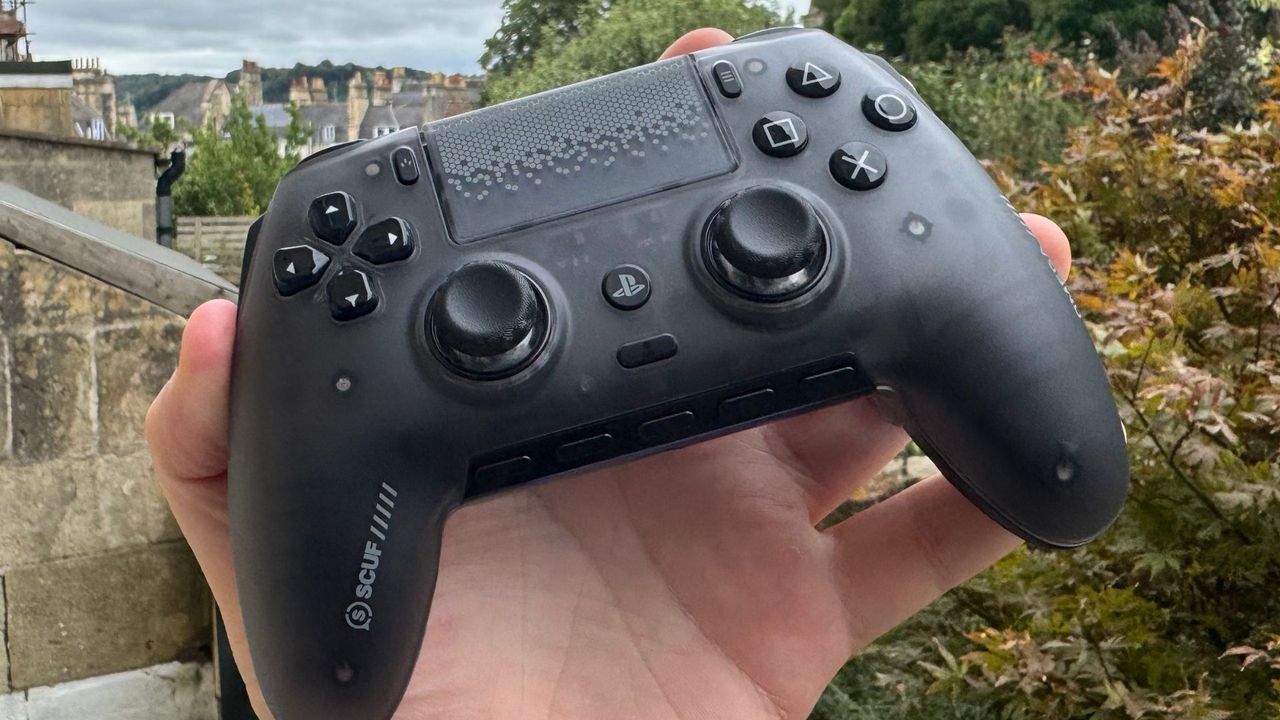
In recent years, Scuf controllers have lost some of their purpose to me. I distinctly remember wanting a Scuf controller to play Call of Duty as a teenager, as they were one of the only brands making solid pro controllers with distinct visuals and partnership deals with pro players.
Now, you can get a pro controller from most major gaming brands, like Asus, Turtle Beach, and Razer, and you can even get cheaper pro controllers from the likes of GameSir.
As such, it's no longer good enough to just offer a few extra buttons; you need to do something truly unique… or truly affordable.
The Scuf Omega attempts the former and gets no way near the latter. Its central selling point is dual compatibility with PC and PlayStation, plus some extra triggers on the grips. But things have changed in recent years, and it needs strong build quality, great feel, and a host of other features to really justify that price.
Buy if…
✅ You want a PS5 controller built for PC: The Scuf Omega is the closest I've felt to Sony's DualSense not made by Sony.
Do not buy if…
❌ You won't use it on PS5: If you simply want a PC pro controller, there are much stronger choices from Scuf's competition.
Features
Scuf Omega Pro SpecsScuf Omega specs
Layout
Symmetrical
Thumbsticks
TMR
Connectivity
Wired and wireless (Bluetooth or 2.4 GHz), PC and PlayStation 5
Battery life
17 hours
Polling Rate
Up to 1,000 Hz (250 Hz on PS5)
Weight
254 g
Price
$220 | £210
Perhaps the most notable thing about the Scuf Omega is the fact that it's sort of a Sony DualSense controller. Being officially licensed by Sony, it has a PlayStation button slapped on the front of it, and its curved sides, shape, and touchpad are all reminiscent of Sony's pad. Triggers and buttons sound different, but in the hand, it feels very familiar. Well, except for the five buttons down the bottom, the two buttons on the sides of the controller, and four paddles on the back. Oh, and also you can take the faceplate off. Okay, maybe it's closer to the DualSense Edge, actually.
With the Scuf Omega, you also get most of the modern trappings of a pro controller. TMR sticks? It's got 'em. Extra buttons? You betcha. 8,000 Hz polling? Well, no. The Omega only goes up to 1,000 Hz on PC, and is locked to 250 Hz on PS5.
It's true that the average gamer does not need 8,000 Hz polling, as reaction time isn't great enough to actually justify it. That goes doubly so for wireless devices, which will see a reduced battery life the higher the polling rate goes. It's also true, though, that when you are paying up to $200 for a controller, you should probably expect competitive-level specs.
And that's strange, as all the extra buttons are intended for a more hardcore audience. If you can click buttons more efficiently, you can click them quicker. So, in some ways, it feels like a competitive device, and in others it doesn't.
Scuf has kitted the Omega with Omron mechanical switches, which allow for snappier, more responsive controls, and it has five 'G-keys' at the bottom of the controller that can be customised to do whatever control you like.
With around 15-20 hours of battery life, the Omega is better than Sony's offerings but offers less than the pro controllers from Razer and GameSir.
In the box, you get the controller's 2.4 GHz connector, a carry case, a 6 ft braided cable, plus three extra thumbsticks and blanking plates to replace the inner paddles and side buttons. That means the Omega can look like a relatively standard controller with some light tweaking.
Ergonomics
I really quite like the Scuf Omega in the hands. It's light, comfortable, and its buttons are easy to press. It's the closest I've ever seen a competitor get to Sony's pads in size and feel, and that's not a bad thing. If it weren't for the DualSense's habit of getting stick drift, I'd use them much more than I do now.
I spent a few weeks trying to get the most out of all the Omega's buttons, and I give myself a pass on that test. The buttons on the side default to the bumpers. This control scheme means you can keep your fingers on the bumpers indefinitely and control both by squeezing on the controller.
In this position, I struggle to get purchase on the controller to hit the very bottom paddles. The side triggers didn't make their way into my regular rotation, but I did find myself using the bottom four buttons for games like Fortnite, and even as a quick-fire parry button in Resonance: A Plague Tale Legacy.
The problem with having so many buttons is I could never quite find a way to hold the controller where I could comfortably hit them all. But then again, there are so many buttons that you can afford to miss some and have backups in other places. It requires a little fine-tuning and customising, but I did find myself to be a tad quicker on the Omega than a traditional controller without any spare buttons.
Performance
Sony locks polling down to 250 Hz for non-official controllers on PS5, so that's the max there, but the 1,000 Hz polling feels like a noticeable miss on PC, given many high-end gamepads have now stepped things up to 8K. The controller has competitive intent with all those buttons, but you can find other options like the GameSir G7 Pro offering the same polling, plus stick drift-resistant sticks, and it even comes with a charging dock, too. The battery life on the Omega is okay for a controller, but a smart charging system would fit it much better.
As well as this, it has dual connectivity with Sony and PC, but only comes with one connector. The likes of the Turtle Beach Stealth 700 Gen 3 and Stealth Pro II come with two connectors to seamlessly swap between devices, and I wish Scuf went in the same direction here. You also swap connections by taking the faceplate off, which adds even more time to the process.
Buttons do feel smooth under the fingers, though; the D-pad is well defined and clicky, while the triggers feel snappy and consistent in both the linear and long-press mode. Scuf's Omicron mouse-like switches make snappy shooting in the likes of Fortnite super easy, and the TMR thumbsticks are easy to use.
I played the entirety of Onimusha: Way of the Sword on the Scuf Omega, and the abundance of buttons plus the comfortable feel made parrying, attacking, and running a breeze.
Build quality
Though I'm not afraid of breaking the controller if I squeeze it too hard, I do find this gamepad to be notably behind Razer's pro controller offerings in its firmness. It just doesn't have the same strength of materials. It also has a light rattle if I shake it. Admittedly, I don't spend much time shaking controllers, but it contributes to the controller feeling a little cheaper than its competitors.
Aesthetics
The Scuf Omega I've been testing is the Smoke model, and apart from the RGB strip down the bottom, it's pretty understated. There's a block pattern on the touchpad, and some light branding on the grips, but nothing too loud, especially when considering the other Omega options. And, in fairness, the RGB serves a purpose here. The five buttons at the bottom are a mute button, a volume up and down button, and two customizable keys, so the RGB lighting helps signal which button is which.
The Smoke model is like a cross between black and grey. It's semi-transparent so you can kind of make out the internals, but it's not so transparent that it's reminiscent of the see-through console trend that was popular in the 2000s.
There's no hiding the mass of extra buttons on the controller, but Scuf has done a decent job blending them into the natural shape of it. The only part that feels odd is the two most central paddles on the back of the controller. I do quite like that you can take off the faceplate, meaning you could feasibly replace it, but there are no Omega faceplates on the Scuf store as of the time of writing.
Software
Scuf's software situation has always been a bit confusing to me. It does have software, but only software you can customise on its mobile phone app. So, if you want to toggle something for it while playing on your PC, you have to take your phone out and customise it from there.
The app lets you customise brightness, change polling rate, set SOCD, update firmware, and adjust calibration. The app itself works really well. It pairs your phone to your controller very quickly, is intuitive to use, and didn't falter during my time with it.
Value
The Scuf Omega is a mighty tough sell. If you specifically want a PC and PS5 pro controller, the Razer Raiju V3 Pro is the same price, offers stronger build quality, and a higher polling rate on PC. The Omega does have two buttons on the side, and five extra on the bottom that the Raiju doesn't, but my grubby mitts would be reaching for the textured grips of the Raiju instead.
Then, if you simply want a strong pro controller with extra buttons, I'd be picking the Wolverine V3 Pro and its 8,000 Hz polling rate for the lower price of $200.
Finally, if you simply want something well built with a few extra buttons, I'd go significantly cheaper and pick up either the GameSir G7 Pro or GameSir G7 Pro 8K for $70 and $80 respectively. These two GameSir picks also include a charging dock.
At 70% of its current cost, Scuf could have been on to a real winner here, but it's simply too expensive for a good but not great pad.
Original reporting appears on the publisher’s site.
Open original article →